Free PDF Filler No Watermark
Upload any scanned, flat, or interactive PDF, draw fields manually for free, type your data, and download a clean completed copy. No watermarks. No Adobe. No credit card.
By uploading, you confirm you have the legal right to use this document.
Free to fill, edit & preview any PDF. Your first clean download is free — then a small one-off pack unlocks 25 more clean exports.
Free account required. No credit card required.
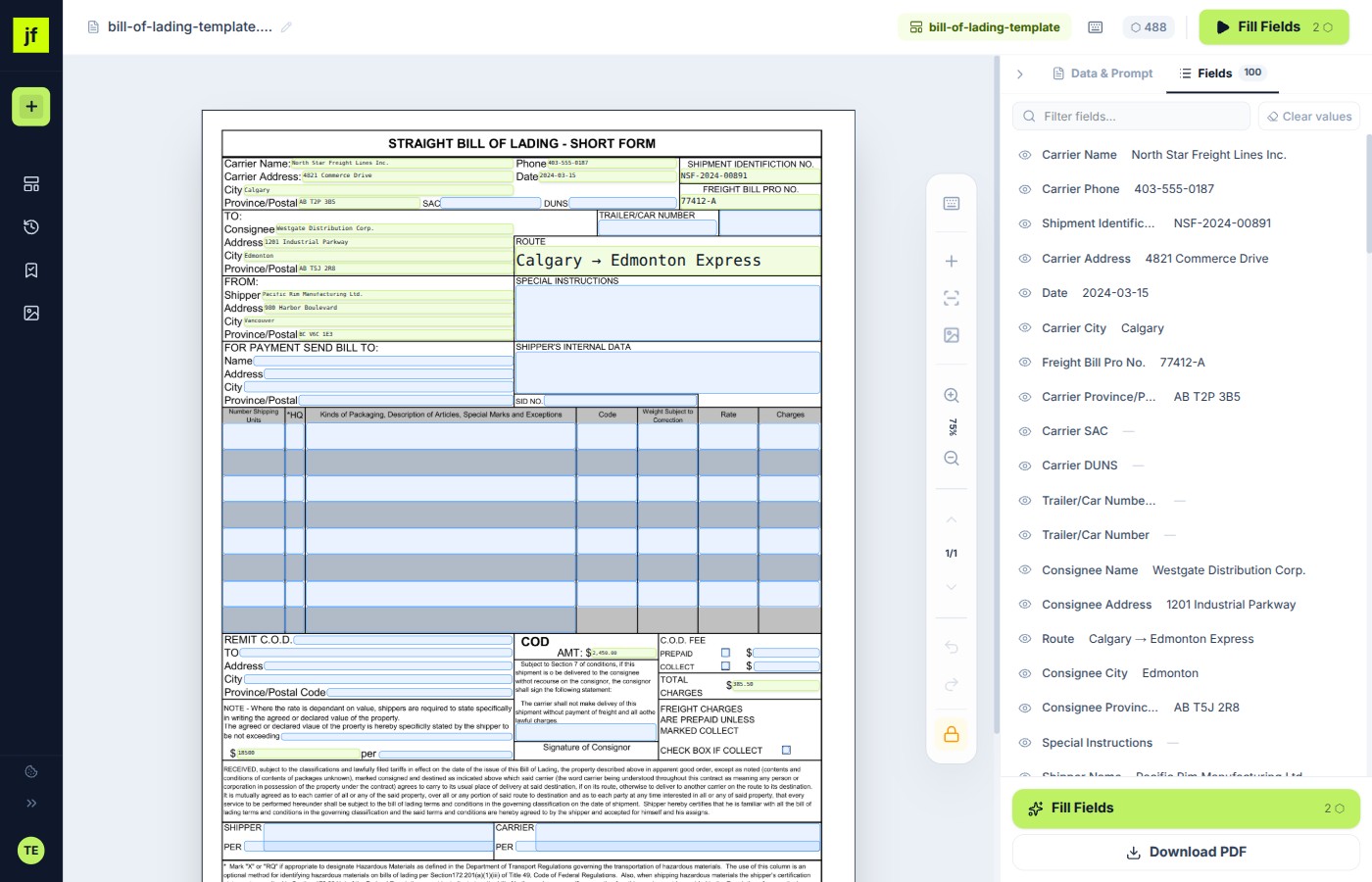
Built for Manual Field Drawing, Not Just Typing
Use this page when your PDF does not already have clickable fields. If you simply need a quick upload-and-type workflow, the Fill PDF Online page is the more direct tool page.
Draw fields for free
Create text boxes exactly where your form has blank lines, table cells, or open areas. Manual field drawing does not use AI credits.
Clean, unbranded downloads
Your clean downloads carry no logos, banners, or branding. The first one is free; after that, a small one-off pack unlocks 25 more clean exports.
Save layouts for later
When a document repeats monthly or quarterly, save the field layout once and reuse it instead of rebuilding the same form.
What You Get for Free
JustFill's free tier isn't a crippled demo — fill, edit, and preview any PDF for free, every day, with a free clean download to start.
Everything You Need to Fill PDF Documents
Whether you're filling a single tax form or processing hundreds of invoices, JustFill adapts to your workflow.
Upload Any PDF
Works with scanned documents, flat PDFs, and interactive AcroForms. No special formatting needed.
Draw Fields by Hand
Click and drag to create text fields anywhere on your PDF — completely free, no AI credits required.
AI Auto-Detection
Let AI analyze your document and detect every fillable field automatically. Available on paid plans.
Voice Dictation
Speak your data instead of typing. Supports English, Polish, German, French, and Spanish.
Save & Reuse Templates
Save field layouts as templates. Fill the same form type again in seconds — just paste new data.
Instant Download
Download your filled PDF immediately — clean, no waiting, no email required. Your first clean download is free.
Supported Document Types
Unlike most free PDF fillers that only handle interactive forms, JustFill works with every type of PDF document you'll encounter — from scanned paper to complex government filings.
Scanned Paper Documents
Paper forms you've scanned or photographed. JustFill renders the image and lets you draw fields on top. For best results, scan at 300 DPI with a flatbed scanner — phone camera scans work too, but higher resolution means sharper text and more accurate AI field detection.
Flat (Non-Interactive) PDFs
PDFs exported from Word, Excel, or design tools that look like forms but have no built-in fields. This is the most common type — you see blank lines and checkboxes, but clicking them does nothing. JustFill lets you draw fields directly over those blanks.
Interactive AcroForms
PDFs with embedded form fields (text inputs, checkboxes, dropdowns) built with Adobe Acrobat or similar tools. JustFill detects these native fields automatically, so you can start typing right away without drawing anything.
Government & Tax Forms
User-provided government and tax PDFs are often flat or poorly structured, which breaks most free tools. JustFill's manual field drawing works regardless of how the PDF was created. Always download official blank forms from the publishing agency and verify current instructions before filing.
Insurance & Medical Forms
Health insurance claims, patient intake forms, HIPAA authorization, dental records requests, and disability paperwork. These forms often mix checkboxes, signature lines, and text fields across multiple pages. JustFill lets you work through each page at your own pace.
Legal & Business Documents
Contracts, NDAs, lease agreements, invoices, purchase orders, and vendor registration forms. Save your company details as a template and fill new contracts in seconds instead of retyping the same address and EIN every time.
Popular forms with step-by-step guides
Need help with a specific form? We have dedicated guides for the most common government forms our users fill repeatedly:
Fill PDF Free in 3 Steps
Upload your PDF
Drag and drop any PDF file. JustFill renders it in your browser — your file never leaves your device until you choose to process it.
Add fields and fill data
Draw text fields by clicking and dragging, or let AI detect them automatically. Type your data directly into each field, or use voice dictation.
Download the filled PDF
After signing in, click "Download" to get your completed PDF instantly — no quality loss, no Adobe account. Your first clean download is free, then a small one-off pack unlocks 25 more clean exports. Your free account also keeps saved templates and sessions available later.
Complete Guide: Filling a PDF Step by Step
A detailed walkthrough covering everything from preparing your document to downloading a perfectly filled PDF.
Preparing and Uploading Your PDF
Start by navigating to the JustFill editor and clicking "Upload PDF" or dragging your file directly onto the page. JustFill accepts PDF files of any size — there's no file size limit on the free tier.
If you're working with a scanned document:
- Scan at 300 DPI or higher for the sharpest rendering. AI field detection is noticeably more accurate at 300 DPI compared to the typical 150 DPI default on most scanners.
- Use a flatbed scanner over a phone camera when possible. Phone scans often have perspective distortion and uneven lighting that makes text harder to read.
- Save as PDF, not JPEG. If your scanner gives you image files, combine them into a single PDF using your OS's built-in print-to-PDF feature before uploading.
If your PDF came from Word, Excel, or Google Docs:
- These are "flat" PDFs — they look like forms but have no interactive fields. JustFill handles them perfectly. Just upload the file as-is.
- Avoid password-protected PDFs. If the file requires a password to open, remove the protection first using your PDF viewer's security settings.
Adding Fields and Entering Your Data
Manual field drawing (free):
- Click the "Add Field" button, then click and drag on the PDF to create a text field exactly where you need it. Position it over the blank line, checkbox, or area you want to fill.
- Resize fields by dragging the corner handles. Make the field large enough to fit your text comfortably — the font size adjusts automatically to fit the field dimensions.
- Multi-page forms: scroll down to navigate between pages. Fields are page-specific, so you can work through a 20-page document one page at a time without fields from page 1 interfering with page 5.
AI auto-detection (paid plans):
- Click "Detect Fields" and the AI analyzes the entire document, identifying every fillable area — text lines, checkboxes, date fields, signature blocks, and more.
- Review the detected fields and adjust any that need repositioning. The AI is accurate on well-structured forms but may need minor tweaks on unusual layouts.
Entering data:
- Click on any field and start typing. Use Tab to move between fields quickly — this is especially useful on long forms with dozens of fields.
- Voice dictation (paid): click the microphone icon and speak your data. Supports English, Polish, German, French, and Spanish. Useful when you're filling the same information across multiple forms and don't want to retype it.
Downloading and Sharing Your Filled PDF
When you're done filling, click "Download" in the top toolbar. Your filled PDF downloads immediately from your account — no waiting queue. Your first clean download is free; after that, a small one-off pack unlocks 25 more watermark-free exports. Your free account keeps templates and saved sessions available for future forms.
- Clean, professional output. Your clean downloads are identical to the original PDF with your data rendered directly onto the pages. Recipients can't tell it was filled with JustFill.
- Original quality preserved. The PDF resolution, fonts, colors, and layout remain exactly as they were. Your filled data appears as native PDF text, not as an image overlay.
- Save as template: if you'll need to fill this same form type again (monthly reports, recurring invoices, quarterly filings), click "Save Template" to store the field layout. Next time, upload a blank form and load the template — all your fields appear instantly, ready for new data.
Pro tip: before downloading, scroll through every page to double-check your entries. It's easy to miss a field on page 3 of a long form. The field list panel on the left shows all fields across all pages — any empty fields are highlighted so you can spot gaps quickly.
JustFill vs Other Free PDF Fillers
Most "free" PDF tools add watermarks, limit file size, or only work with interactive AcroForms. With JustFill, filling PDF free means no compromises — it works with any document, no Adobe required.
Who Uses JustFill?
Small Business Owners
Fill invoices, contracts, and tax forms without expensive PDF software. Save templates for recurring paperwork.
Freelancers & Contractors
Quickly fill client intake forms, W-9s, and project agreements. Voice dictation makes it even faster.
HR & Compliance Teams
Process employee onboarding forms, policy documents, and regulatory filings at scale with reusable templates.
Anyone with a PDF to Fill
Government forms, medical intake, school applications, insurance claims — if it's a PDF, JustFill handles it.
Related Guides
Adobe Fill & Sign Alternative
Adobe retired the Fill & Sign mobile app — see how JustFill replaces it free, in any browser.
How to Fill PDF Form Online Free
Step-by-step guide to filling out any PDF form directly in your browser, no software needed.
Fill In PDF Documents Free
Learn how JustFill handles flat PDFs, scanned forms, and AcroForms — all without paid software.
How to Make a PDF Fillable
Turn any PDF into a fillable form — from Word, Excel, scanned documents, or flat PDFs.
For business teams: turn recurring PDFs into reusable workflows
Frequently Asked Questions
Everything you need to know about filling PDFs with JustFill.
Ready to fill your first PDF?
Create a free account and start filling forms in under a minute. No credit card — your first clean download is free.
GDPR compliant. No credit card required.